For the people who approve the tool list
MCP connectors: open source is where the policy lives
An MCP connector is the entry an agent uses to reach one MCP server: the tools it may call there, the account each call runs as, and the rule that decides whether the call runs. Kortix is open source, and its connectors are entries in a file you review first.
The open-source AI Operating System
Open source · Approval gates you set · 3,000+ apps in a click
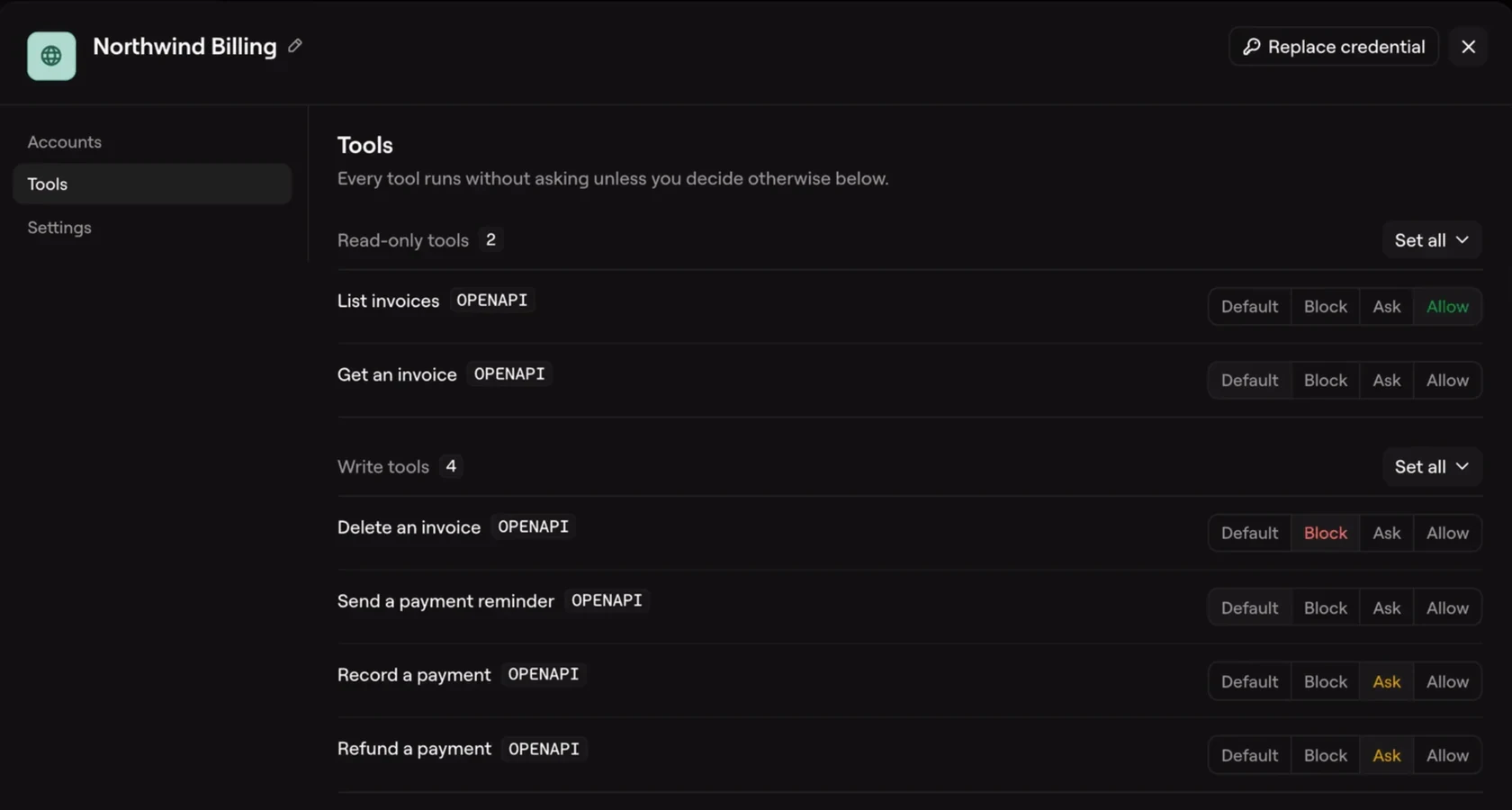
Kortix connector settings: Northwind Billing, Tools
kortix.com/docs/connect/connectors
Connector credentials are brokered server-side and never enter the machine.
connectors:
  - slug: docs-search
    provider: mcp
    url: https://mcp.example.com/mcp
    transport: http
What an MCP connector is
An MCP connector carries three things, and only one of them is in the protocol. A server publishes tools and their schemas. A client discovers those tools and sends the call. The connector is the entry in between, and a working product also loads it with the two parts the protocol leaves to whoever builds it: policy and identity.
Kortix is the open-source AI Operating System. Your agents, skills, company memory, and connectors live in one git repo you own. The connector rules are a file in the repo, so a person can see which tools an agent may call before the agent calls one.
One arrangement, three names
Merge, which sells a connector product, defines one as "an MCP server that's either provided by the software solution or built and maintained by a 3rd-party." The definition gets the unit right. An MCP server supplies tools, and either the vendor or a third party can run it. What the sentence leaves out is who runs the call, and under which identity.
Products bend the word toward the layer they sell. Portkey's MCP Gateway describes itself as a proxy between MCP clients and servers, where one authentication, access control and logging layer applies to every call (Portkey). A managed catalog counts hosted servers as connectors. Each description is accurate about its own layer, and none of them tells a team which call may leave the building.
Keep the words apart and the rest gets easier. The server supplies the tools, the client asks for them, and the connector is the client-side entry with a name, a policy and an account. Four questions test any offering: which tools are on the list, which account a call runs as, whether a write waits for a person, and where the record of the call lives. Whether a connector is the same thing as a server is worth settling before a security review starts.
What the MCP specification writes down
The specification is short and specific about the tool layer. "Tools in MCP are designed to be model-controlled, meaning that the language model can discover and invoke tools automatically based on its contextual understanding and the user's prompts." The model picks from what it can see. Clients send tools/list to discover the tools and tools/call to invoke one.
The spec also splits the security work by side. Servers MUST validate all tool inputs, implement proper access controls, rate limit tool invocations and sanitize tool outputs. Clients SHOULD prompt for user confirmation on sensitive operations, show tool inputs before calling the server, validate tool results and log tool usage for audit purposes.
That second list is a set of recommendations, and a client that skips every one of them still speaks MCP correctly. In production the difference shows on the first write: either it waits for a person or it does not. The protocol has no opinion either way.
What the specification leaves open
Two sentences from Merge's explanation of the protocol mark the gap. "Authentication for MCP servers is implementation-specific, since MCP itself doesn't define a built-in authentication mechanism." And: "Tool access control is handled at the MCP server level, since MCP doesn't offer a built-in permissions system."
That gap is what a connector fills, and it is wider than the transport. The protocol standardizes how a tool is described, discovered and called. Two decisions shape what an agent does to a real system: whether a call runs, and whose authority it carries. The protocol leaves both to the server and the client. A client can hold connections to several servers at once and choose which server handles each call. That is useful, and it is one more place a call can land where nobody planned.
The gap, filled: rules, accounts and a file you can read
A connector in Kortix is a manifest entry: a slug, a display name, a provider, its actions and its policies. The manifest never holds a credential. A provider: mcp entry points at a remote server with a url and a transport (http by default), and a connector with that provider is Kortix calling someone else's MCP server.
Actions are always_run, require_approval, block, shown as Allow, Ask, Block. Approval holds the call; the agent's turn pauses and resumes. Kortix evaluates each call against four levels, and the first match wins:
- Project-wide
policies:inkortix.yaml, with fully qualified patterns such asgmail.send_email. A connector rule cannot override them. - The connector's own
policies:, with patterns relative to it, such assend_*. sensitive: trueon the connector, after which every remaining action needs approval, reads included.policy.default_mode:allow_all(the default) runs every remaining action, whileriskruns reads and holds writes and destructive actions for approval.
The order is the design. A narrow rule at the top cannot be loosened by a broad one further down. A rule can also test the arguments of a call, so a draft can run only when its recipient is inside the company domain. Approval gates you set. Off until you set them. Read the fourth level twice, because policy.default_mode falls back to allow_all.
Identity is the other half. Every call runs as an account, and each account has an owner type. A shared account belongs to the project and reaches every agent whose grant lists the connector, triggers included. A private account belongs to one person and never runs unattended. When a call names no account, Kortix uses one only when the choice is certain, and otherwise denies the call rather than substituting someone else's identity. The credential stays on Kortix's side of the call, so the agent's sandbox never holds it.
Kortix connects 3,000+ apps in a click, plus MCP, OpenAPI, Postman, GraphQL and raw HTTP. The manifest in the code panels has one connector, two rules and a grant. A get_* rule runs reads without a pause. A * rule holds everything else for approval. The agents: block is what lets release-bot reach the connector at all, because an omitted grant means none.
What an MCP connector is not
- An approval gate. The spec asks clients to confirm sensitive operations; a client can decline to ask. The gate is a rule on the connector, evaluated before the call leaves.
- An identity system. The server sees the credential the connector sends, not the person who typed the prompt. The platform's accounts decide who a call runs as.
- An audit log. The spec asks clients to log tool usage. Where that log lives, and who may read it, is a product decision.
- A limit on what the model may choose. The model decides which tool it wants. The policy decides whether the call runs.
Test an MCP connector before it touches production
Five checks work against any offering, Kortix included.
- List the tools, and mark every one that writes. If the product cannot show the list before an agent calls a tool, the rest of the review does not matter. What an agent can see is the first question a reviewer should ask.
- Name the account each call runs as. Ask which one a scheduled run uses, because an unattended run cannot use a private account.
- Send one write and watch the pause. If nothing waits for a person, the gate is off, whatever the settings screen suggests.
- Read the approval's scope. One approval should cover one exact call, with its arguments and account, and a changed argument should need a new one.
- Find the record of a call before you need it. A team that cannot say where a call is logged cannot answer a question about it later.
What MCP asks of each side
Servers MUST:
Validate all tool inputs
Implement proper access controls
Rate limit tool invocations
Sanitize tool outputs

Clients SHOULD:
Prompt for user confirmation on sensitive operations
Show tool inputs to the user before calling the server
Validate tool results before passing to LLM
Log tool usage for audit purposes
Source: modelcontextprotocol.io/specification/2025-06-18/server/tools
One connector, two rules, one grant
The whole entry lives in kortix.yaml, and a person reviews it before an agent runs.
kortix.yaml
connectors:
  - slug: docs-search
    provider: mcp
    url: https://mcp.example.com/mcp
    transport: http
    policies:
      - match: "get_*"
        action: always_run
      - match: "*"
action: require_approvalagents
agents:
  release-bot:
    connectors: [docs-search]
What a governed connector hands back
The work arrives as files: a policy diff, a held call, a tool list with its modes.
Policy diff
The rules arrive as a diff
An agent proposes two rules for a new MCP server and opens a change request a person approves.
+5
Approval
A write waits for a person
The held call names the account and the arguments before the provider sees them.
- Call
- put_page
- Account
- Acme docs
- State
- Held for approval
Tool list
Read the list before the first call
Each action carries its mode, so a reader can see which tools run and which ask.
Where each connector layer does its work
Kortix is open source, and each rival column is built from that product's own documentation.
kortix.yamlQuestions about MCP connectors
Short answers on what a connector is, whether it needs authentication, and how far an agent reaches with one.
What are MCP connectors?
MCP connectors are the client-side entries that carry an MCP server's tools into an agent, together with the account a call runs as and the rule that lets the call run. The server supplies the tools; the connector supplies the policy and the identity.
Is an MCP connector the same as an MCP server?
No. The server publishes a tool list and implements its own access controls. The connector is the entry a team configures to reach that server, with one policy and one account.
Do MCP connectors need authentication?
Yes, in practice. MCP defines no authentication mechanism of its own, so each server's connector supplies credentials through OAuth, an API key or a token passed by the client.
Are MCP connectors secure?
They are as secure as the policy and identity around each call. The spec requires servers to validate inputs and control access, and asks clients to confirm sensitive operations and log calls.
Can an agent use more than one MCP connector?
Yes. A client can hold simultaneous connections to several MCP servers, each in its own session, and it chooses which server handles each call.
Write the rules, then let the agent run.
Connectors, policies and grants in one repo you own.